
Our first post showed how to check the wallets behind a Solana token. This one looks at the token itself. Some tokens still let one account print more supply, freeze holders, or change the token's name and picture. You can see all of that on the chain in a few minutes, with no wallet connected and nothing to sign.
We use FAWK Q as the example because the contract address is public on our homepage and dashboard. The steps work for any Solana token.
This is a how-to for reading public records. It is not financial advice. A token with every authority switched off can still lose value, and checking it tells you nothing about whether you should buy.
What an "authority" is
Every token on Solana has a mint account. That account records who, if anyone, holds special powers over the token. The two that matter most are below.
Mint authority. This account can create new tokens whenever it likes. If it's set, the supply you see today can grow tomorrow. If it's empty (Solscan shows N/A; the raw chain data shows null), nobody can ever mint more. Once it's removed, it can't be put back.
Freeze authority. This account can freeze any holder's token account. A frozen account can't send or sell the token. If it's empty, no one can freeze you.
There's a third one worth checking on newer tokens: the metadata update authority. It can change the token's name, symbol and image. An empty value means the name and picture you see are locked in.
Step 1: Get the real contract address
Copy the contract address (also called the mint) from the project's own site, and check it matches what the project posts on its official X and Telegram. Fake tokens often copy a real token's name and picture, so the address is the only thing you can trust.
For FAWK Q, the address is on the homepage and the dashboard with a copy button.
Step 2: Open the token on Solscan
Go to solscan.io and paste the contract address into the search bar. Make sure you land on the token page, not a wallet page. Solscan lists the token's details there. Right now the authorities sit in the Profile Summary box: click the Authority dropdown to see Mint Authority, Freeze Authority and Update Authority. The layout changes from time to time, so look for those names if they've moved.
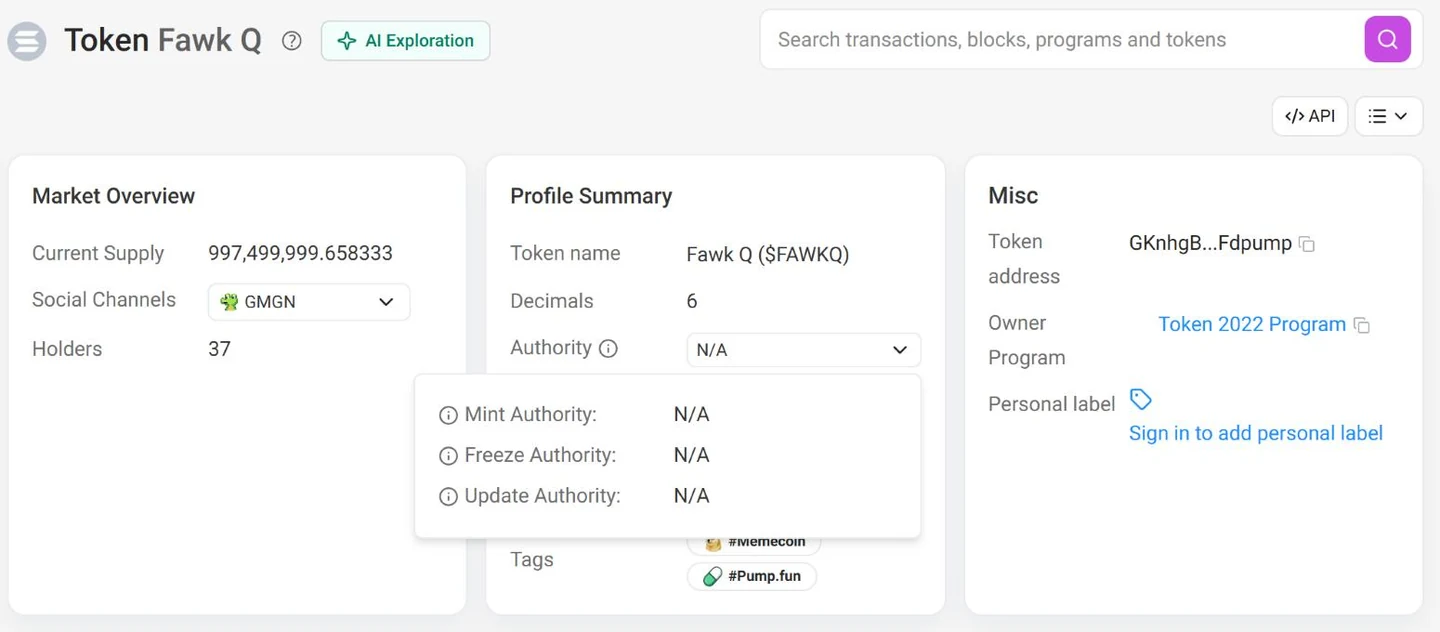
What you want to see for both is an empty value, which Solscan shows as N/A. If either one shows an address, that address holds the power described above. Write it down and look it up too.
Step 3: Check which token program it uses
Solana has two token programs. The original SPL Token program is simple. The newer Token-2022 program lets a token add extra features, called extensions. Most are harmless, but a few hand someone real control:
If the token uses Token-2022, look at its list of extensions on Solscan. Metadata extensions are normal. Any of the four above deserve a close look at who controls them.
Step 4: Check it yourself without an explorer (optional)
If you'd rather not trust any website, including Solscan, you can ask a Solana node directly. Paste this into a terminal, with the token's address in place of FAWK Q's:
curl -s https://api.mainnet-beta.solana.com \
  -H 'content-type: application/json' \
  -d '{"jsonrpc":"2.0","id":1,"method":"getAccountInfo","params":["GKnhgBgyYs8zPvteBoMXjt1Ew962tQYVU8gQztFdpump",{"encoding":"jsonParsed"}]}'
In the reply, look for "mintAuthority" and "freezeAuthority". A value of null means nobody holds that power. The "program" field tells you whether it's spl-token or spl-token-2022, and "extensions" lists anything extra.
What we found for FAWK Q
We ran that check on November 2, 2026. Here's what the chain says:
- Program: Token-2022
- Mint authority: none, so no one can create more FAWK Q
- Freeze authority: none, so no one can freeze a holder's FAWK Q
- Metadata update authority: none, so the name, symbol and image can't be changed
- Extensions: only the two metadata ones (metadata pointer and token metadata). No permanent delegate, no transfer fee, no transfer hook and no frozen-by-default setting.
You can run the same check yourself and compare.
What this check doesn't tell you
Empty authorities rule out a few specific tricks. They don't tell you who holds the supply, where the project's money goes, or whether anyone will want the token next week. For the money side, check the wallets and the receipts on our dashboard. For the rest, use your own judgment, and never put in more than you're fine losing.